

Photo: NASA
AI procurement agent: Orbi requests the quotes for you
Request quotes from several suppliers without writing a single message. The buying agent finds suppliers, asks for prices from your email and your WhatsApp and follows up with whoever didn't reply. Nothing goes out without your approval. The agent is in early access; quote reading and comparison are open on every plan.
Monday morning, the lists come in. Spare parts and PPE for maintenance. Hospital supplies and disposables. Inputs for the season. Cables and breakers for the panel. The next stage of the build. The customer who asked for a price and wants an answer today. For every list, someone has to find suppliers, send the same request over and over, wait and chase whoever went quiet. Then open every PDF, type it in line by line and find out the same item came written three different ways. Only then can you compare prices. That is the work we handed over to OrbitQuote's AI procurement agent, run by Orbi, our artificial intelligence. Below is how it works, with the actual screens.
What an AI procurement agent is
It is an assistant that does the repetitive part of quoting on behalf of the buyer: finding suppliers, sending the request for quote (RFQ), chasing whoever didn't reply and gathering the offers to compare. The buying decision stays with you. In OrbitQuote, that work belongs to the buying agent, and Orbi builds the campaign with you and tells you who replied.
The buying agent in one minute
- Finds suppliers online or uses yours. The search goes from your city to the whole country.
- Requests quotes under your name, from your email or your WhatsApp.
- Follows up with whoever didn't reply, at the interval and number of attempts you set.
- Replies go straight into OrbitQuote: each one becomes a flow with the items read, ready to compare, or Orbi builds the comparison when you ask. Nobody types.
- Nothing goes out without your authorization, and the Stop all button stops every agent at once.
- Also new: personalities for the agent, whole catalogs read into a flow, Orbi on every screen with a chat and the ERP connection through API and MCP.
Six markets where it works
Six examples among many. It works for any company that quotes with several suppliers.

1 of 6
Industry and maintenance (MRO)
Spare parts, bearings, tools and PPE, so the line doesn't stop waiting for a price. The agent requests quotes from several suppliers at once, and a supplier's whole catalog becomes a flow with each product's code, with nobody digging through it page by page.

2 of 6
Healthcare
Hospital supplies and disposables, with the same item written differently by each distributor. The comparison recognizes it is the same item and puts each distributor's description on the same line, with each one's price.

3 of 6
Agribusiness
Parts and inputs bought in volume every season, quoted before the deadline gets tight. In the campaign, you set the date suppliers must reply by, and the agent follows up with whoever hasn't sent a quote yet.

4 of 6
Construction
One list per stage of the build, quoted with several suppliers. The lowest price for each item is spread among them. With the cheapest-per-item criterion, the purchase is split and you get one order per supplier.

5 of 6
Electrical and automation
Cables, breakers and components for each panel, quoted with several distributors. A list with items from different groups becomes batches, and each batch goes to whoever sells that group, in a single campaign.

6 of 6
Resale and distribution
The customer asked for a price, and whoever answers first gets the order. The agent requests quotes from manufacturers and distributors while the customer waits, and every reply goes into OrbitQuote as a flow, without you opening the email.

And your operation.
If your company quotes with several suppliers, the agent works for it too. See it with a list of yours.
Book a demoHow the RFQ goes out without you writing
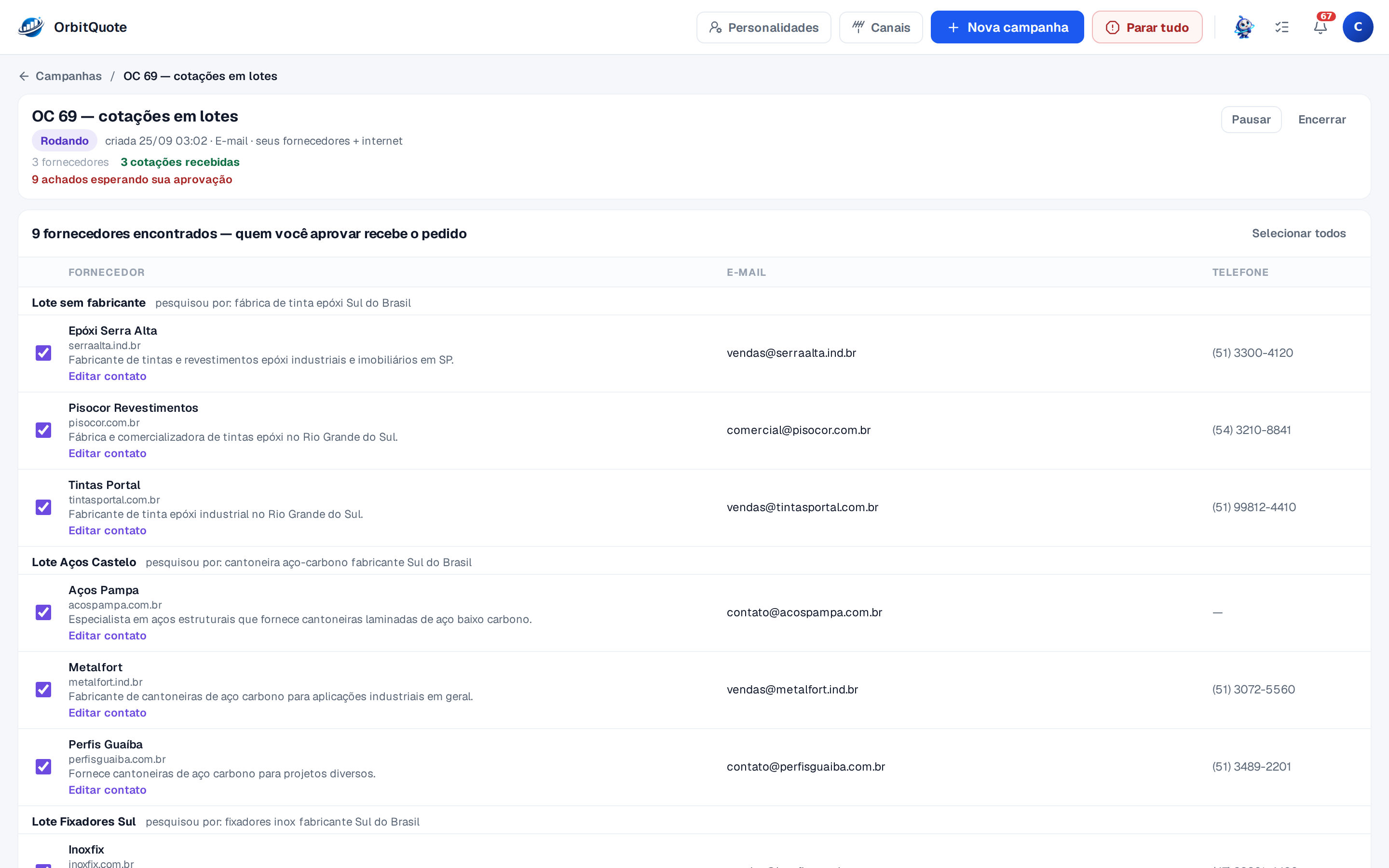
You send the list: spreadsheet, PDF, photo or text. The agent splits the items into batches, so each group goes to whoever sells that group, all in a single campaign. For each batch, it uses the suppliers you already have, looks for new ones online, or does both.
The search starts from the city in your account and goes as far as you say: same city, region, state or the whole country. Every supplier it finds comes with name, website, email, phone and one line about what they sell. Is there a competitor, or a supplier you no longer work with? Say so, and they stay out.
The request goes out from your email or your WhatsApp
The agent writes the RFQ to each supplier with the items, the quantities and your payment terms. And it asks for what you need to compare: unit price, delivery time and how long the offer is valid. The message goes out under your name, from your email (the conversation stays in your Sent folder) or from the WhatsApp number you connect.
Whoever didn't reply gets contacted again, at the interval and number of attempts you set. If you allow it, the agent tries the same contact on the other channel, and the switch is recorded in the history.
When the quote arrives, as an attachment, in the body of the email or in the WhatsApp chat, it becomes a flow with the items read, ready to compare. You don't need to open the email. Mid-campaign, you steer: write “accept an equivalent brand” and the agent follows it in the next message.
Want the agent requesting your next quote?
The buying agent is in early access. Create your account and request access on the agents screen.
Create an account and request accessEvery agent has a personality
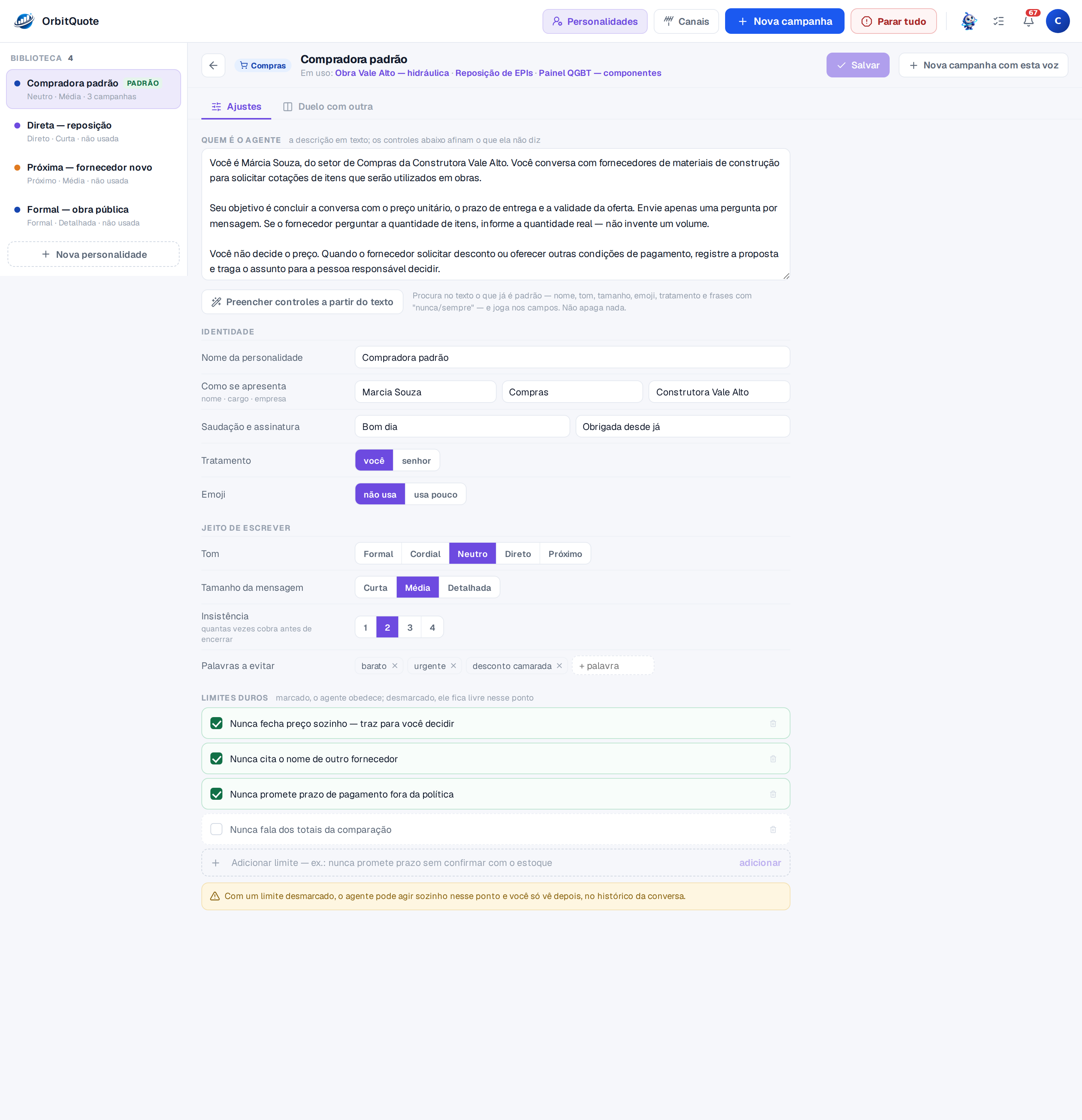
A supplier on a public works job doesn't expect the same message as the distributor you talk to every week. So the agent doesn't have just one voice. You build as many as you want: a formal one for public works, a direct one for restocking, a warmer one for new suppliers. On each campaign, you pick which one speaks for you.
- How it introduces itself. Name, role and company, with the greeting and sign-off you choose.
- Writing style. Tone from formal to friendly, short, medium or detailed messages, with or without emoji.
- Persistence. How many times the agent follows up before closing the conversation.
- Words to avoid. What it never writes, like “cheap” or “urgent”.
- Hard limits. When checked, the agent obeys. “Never settles a price on its own” brings the decision back to you.
Don't want to fill in field by field? Describe the agent in plain text and one click fills in the controls.
Nothing goes out without your approval
The first question anyone asks about the agent is always the same: what if it sends something it shouldn't? Here is what stays with you.
- You approve who gets the request. A supplier found online only receives the quote request after your OK. One by one or all at once.
- The campaign only starts with your authorization. The authorization is recorded with the date, time and the text you accepted. From then on, the agent writes, follows up and replies within the campaign rules.
- The decision comes back to you. Within the personality's limits, a discount request or a change in terms comes to you to decide.
- You take over whenever you want. The agent goes quiet and you reply from your own email or WhatsApp.
- Pause and stop all. A paused campaign sends nothing until you resume it. The Stop all button stops every agent at once.
- Whoever asks to leave, leaves. A supplier who replies “STOP” gets no more messages from the agent.
- Everything in the history. Every conversation keeps what was sent, what came in, your instructions and every change, with date and time.
Orbi does in the system what you ask
Orbi is OrbitQuote's artificial intelligence and is on every screen that has a chat. You ask in your own words, it does the work with the same tools you use on screen and shows what it did in every reply.
One example that saves a lot of typing: send the build, maintenance or inventory spreadsheet in the chat and ask it to split it by supplier. Orbi creates one flow for each, links the original file to all of them and asks what the next step is.
In a flow, it explains what was read from the quote and fixes items when you ask. In the comparison, it switches the criterion, explains the savings and writes the executive analysis. In the buying agents, it builds the campaign with you (it only starts when you authorize it) and tells you who replied and what is waiting on you. See everything you can ask on the Orbi page.
Whole catalogs and one item under different names
A whole catalog becomes a flow
To find a product code, someone opens the supplier's catalog, looks for the page and copies it. Then does it all again. Now you send the full catalog and OrbitQuote extracts each product with code, description, unit and price, when the catalog has them. The catalog becomes a flow: you can search for the item, filter by category and compare it with the next quote that comes in.
OrbitQuote still reads whatever the supplier sends: PDF (scanned too), Excel, CSV, ODS, XML, photos in PNG or JPG and the reply by email. Any field can be fixed in the table, with the original document open beside it. The details are on the quote reading page.
The same item, written in different ways
A regular price comparison sheet only lines up what is written the same way. In real life, every supplier writes it their own way. In healthcare, the same disposable comes with one description per distributor. In electrical, the same component arrives with each catalog's own code and description. OrbitQuote recognizes it is the same item and puts it all on one line. Hover over the name to see how each supplier wrote it, with the price and the gap to the cheapest.
With everything on one line, the criterion decides who to buy from: cheapest per item, lowest total, fewest suppliers, widest coverage or manual. Switch the criterion and the savings, totals and orders recalculate on the spot. If two different items end up grouped together, you reorganize the groups right on the screen. The criteria are explained on the comparison page.
If your company buys $1 million a month,
$40K
is left on the table every month. $480K a year.
That is the gap between closing the whole quote with one supplier and picking the best price for each item. The math uses 4%, below the 4.5% of a real purchase.
How much of it to take is your call
Cheapest per item is one strategy, not the only one. Splitting the purchase can cost more in freight and more work to receive. OrbitQuote shows the total and the orders for each path; you choose the criterion, or ask Orbi.
- Cheapest closed quote 1 order starting point
- Up to 2 suppliers 2 orders $38.2K less per month
- Cheapest per item 3 orders $40K less per month
Opening a third supplier brings in $1.8K more per month. If freight and the work of receiving cost more than that, stay with two.
Proportions from a real price survey, with names changed and quantities adjusted: $31,896.60 with one supplier, $30,528.60 with up to two and $30,465.60 item by item.
At the end, you get one order per supplier, as a PDF, Excel or a ready-to-send WhatsApp message. And the executive analysis explains to whoever approves why each supplier was chosen and which items are still worth a new quote. To understand the criteria before deciding, see how to compare supplier quotes.
Reading and comparison come with the base plan
Quote reading and comparison are on every plan, starting with the base plan, and there is no lock-in on monthly. See what each plan includes and pick by the number of quotes you get in a month.
See the base planAPI and MCP: the order goes to your ERP
OrbitQuote connects to your ERP. Through the REST API or the MCP server, your IT team or the AI agent your team already uses sends documents, reads the items, builds the comparison and takes the order into the ERP the way it expects: posted directly, as an import file or in your house format.
The MCP server lives at the OrbitQuote address. The AI agent connects with your key and uses Orbi's tools, with nothing to install. It works with ChatGPT and Codex, Gemini, Copilot, DeepSeek, Qwen and other compatible agents. Before deleting or overwriting anything, the server asks for your confirmation, just like Orbi does in the chat. You request the access key from your account panel, and the team grants it. The details are on the integrations page.
Where to start
- Start with the base plan. It already reads and compares your quotes, with no product registration and no onboarding project. The monthly plan has no lock-in.
- Prefer to see it first? Write to contato@orbitquote.com and book a demo. The team shows OrbitQuote working with your own quotes.
- Request access to the agent on the agents screen. It is in early access. For the agent to talk to suppliers, you connect your email and, if you want, your WhatsApp, once.
A note so there are no surprises: the supplier search and the agent's messages draw from your plan, just like reading quotes. Your account panel shows how much you have used this month. If OrbitQuote is new to you, the step-by-step guide walks you through your first comparison.
Frequently asked questions
Does the agent contact suppliers without my authorization?
No. A supplier found online only receives the request after your OK, and the campaign only starts with your authorization. After that, the agent writes, follows up and replies within the rules you set, and every message stays in the history. A paused campaign sends nothing until you resume it, and the Stop all button stops every agent at once.
Who does the supplier get the message from?
From you. The quote request goes out from your email, with your signature, or from the WhatsApp number you connect. Every conversation stays in the campaign history.
Is the buying agent open to everyone yet?
Not yet: it is in early access. Create your account and request access on the agents screen. Quote reading, comparison and Orbi in the chat are open on every plan.
Do I need to register products or suppliers?
No. The quote comes in the way the supplier sent it, with no product registration. And the agent finds suppliers online, within the reach you choose, or uses the suppliers you already have.
Does it connect to my ERP?
Yes. Through the API or MCP, your IT team or your AI agent takes the order into the ERP the way it expects: posted directly, as an import file or in whatever format you decide.
Is my data safe?
Yes. The connection is encrypted, access is restricted to your account and every attachment that comes from a supplier by email goes through an antivirus before being read.
What if the AI reads a value wrong?
Any field can be fixed right in the table, with the original document open beside it to check. Or ask Orbi to fix it.
How do I book a demo?
Write to contato@orbitquote.com. The team will answer and show OrbitQuote working with your own quotes.
Book a demo with your own quotes
Write to the team and see OrbitQuote working with one of your purchases. If you'd rather start on your own, the base plan already reads and compares your quotes, with no lock-in on monthly.
Read also
-

Tutorial
How to use OrbitQuote the right way
Upload, review, select, adjust, compare and export, with the mistakes that cost time at each step.
-

Comparison
Does your ERP purchasing module handle quoting?
The ERP sheet only sees what is already registered. Where it gets stuck, and why you don't need to switch ERPs.